Best Soldering Iron for PCB Boards by Wattage

Seven kits compared for PCB work, from an 80W LCD pencil iron to a 110W station with a preset memory. Where wattage matters, and where it stops mattering.

By Dexter GillUpdated 17 min read
On this page
- Best soldering iron for pcb boards at a glance
- Who this guide is not for
- What wattage actually does on a PCB
- 1. Q-MING 80W Soldering Iron Kit — Best overall
- 2. WEP 927-IV Soldering Station — Best premium
- 3. KEPIOG 100W Digital Soldering Iron Kit — Best minimal setup
- 4. Kaisiking Helping Hands with Magnifying Glass — Best upgrade
- 5. Q-MING 60W Soldering Iron Kit — Best for families
- 6. LuTangous Universal Magnetic Helping Hands — Most versatile
- 7. Gikfun SMD Practice Board — Best budget pick
- How I screened seven kits down to the shortlist
- Is a station worth it over a pencil iron?
- What the listings do not tell you about tips
- Do you need helping hands or a magnifier?
- The verdict
- FAQ
The best soldering iron for pcb boards here is the Q-MING 80W LCD kit, because 80 watts through a ceramic core with an LCD readout gives you the recovery time a pad needs without cooking the board. If you want a permanent bench setup with 110W and three preset channels, the WEP 927-IV station is the better buy. Both come with five spare tips, and the wattage gap only matters on larger ground planes.
Best soldering iron for pcb boards at a glance
| Pick | Wattage | Included with iron | Price |
|---|---|---|---|
Best overall Q-MING 80W Soldering Iron Kit |
80W | 5 tips, stand, sponge, solder, flux | Check Price |
Best premium WEP 927-IV Soldering Station |
110W | 5 tips, helping hands, LED magnifier, tweezers | Check Price |
Best minimal setup KEPIOG 100W Digital Iron Kit |
100W | 5 tips, magnifier stand, solder | Check Price |
Best upgrade Kaisiking Helping Hands with Magnifier |
Iron not included | 2.5X magnifier, 4 gooseneck arms, weighted base | Check Price |
Best for families Q-MING 60W 10-in-1 Iron Kit |
60W | 5 tips, stand, sponge, solder, flux | Check Price |
Most versatile LuTangous Magnetic Helping Hands |
Iron not included | 6 magnetic pillars, stainless base | Check Price |
Best budget pick Gikfun SMD Practice Board |
Practice board only | PCB with marked components | Check Price |


Who this guide is not for
Two of the seven picks are not soldering irons at all, and one is a practice board. That is deliberate, because a workbench for PCB work is more than the iron. But if you landed here expecting a shortlist of seven complete irons, the honest map is four irons, two helping-hands stations, and one training board.
If you are soldering surface-mount components smaller than 0603 daily, none of these are the right answer either. That is hot-air rework and a temperature-controlled station with closed-loop tip sensing, which is a different category and a different budget. This guide covers through-hole PCB work, header pins, connectors, wire repair, and occasional larger SMD like SOIC-8. That is where most hobbyists live.
Also worth naming: the phrase "for pcb boards" in the search does not narrow the field the way you might expect. Every iron sold under this category description is used on boards. What matters more is wattage, tip range, and whether the temperature is closed-loop or open-loop. The picks below are sorted with those in mind, not the marketing.
What wattage actually does on a PCB
Wattage is not top speed. It is thermal recovery: how quickly the tip refills its heat after you touch it to a copper pad that is draining energy away. On a small signal trace, 40 watts is enough. On a ground plane connected to a large pour, a 40W iron sags and you end up leaning on the joint, which lifts pads. This is the specific failure mode that ruins beginner PCB work.
That is why the 80W Q-MING leads this set. Its ceramic heater is claimed to reach working temperature within 20 seconds, and the extra thermal headroom over a 60W pencil matters the moment you hit a via with a plane on it. The KEPIOG at 100W and the WEP station at 110W give you more headroom still, and both let you dial the setpoint down.
Two other numbers matter:
- Temperature range. The Q-MING 60W and WEP station both publish 392°F to 842°F (200°C to 450°C), which covers lead-free and leaded solder.
- Tip variety. Five interchangeable tips in the box lets you match tip mass to joint size. A conical tip on a large pad is why beginners think their iron is underpowered.
Best soldering iron for pcb boards decisions almost always come back to those two, not the headline wattage alone.
1. Q-MING 80W Soldering Iron Kit — Best overall
An 80W ceramic-core pencil with an LCD readout and five tips in the box, at an entry-level price.
Best for: hobbyists soldering through-hole parts and repairing consumer boards Skip it if: you want stored temperature presets
Within this set the 80W Q-MING sits in the sweet spot. It has more thermal headroom than the 60W kits, and it costs less than the 100W and 110W picks. Q-MING says the ceramic heater reaches working temperature within 20 seconds, and the LCD shows the current setpoint so you are not guessing where the dial is. The kit ships with five tips, a stand, a sponge, solder wire and flux paste, so nothing extra is needed to start a first PCB.
The handle has four ventilation holes on the barrel that the listing says improve heat dissipation, which is the manufacturer's fix for the hot-handle problem cheaper irons have. Where this pick loses to the WEP 927-IV is the workbench experience: no preset channels, no dedicated stand with a tip cleaner, and no magnifier. It is a hand-held pencil iron. For most PCB work at home, that is what you want.
Pros:
- 80W ceramic heater with an LCD setpoint readout
- Five interchangeable tips included
- Ventilated barrel keeps the handle cooler
- Second-cheapest kit in this set
- Stand, sponge, solder and flux included
Cons:
- No memory presets, so the setpoint resets between sessions
- Basic wire stand only, no dedicated cleaner or magnifier
- Model listed as 80W-BLUE with no published warranty
2. WEP 927-IV Soldering Station — Best premium
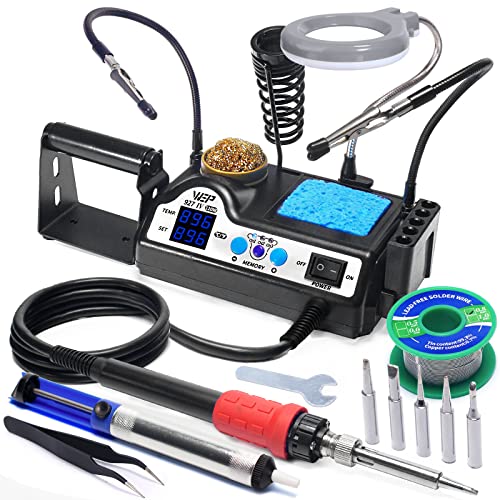
A 110W station that folds iron, helping hands, LED magnifier, tip cleaner and storage into a single 2.25 lb base.
Best for: a workbench where the iron lives out permanently Skip it if: you need something to throw in a bag
The WEP 927-IV is the most expensive pick here, and the only one that publishes the full workstation kit as a single unit. WEP says the 110W element covers 90°C to 480°C (194°F to 896°F) and three preset channels let you save frequent setpoints, so a lead-free tip temperature and a leaded tip temperature can sit on separate presets. Sleep mode is claimed too, though the listing does not detail the timeout.
The base measures 1.89 by 5.91 by 3.94 inches and weighs 2.25 lb, so it stays put on a bench. Included: five extra tips, tip cleaner, two helping hands, an LED magnifier, tip storage slots, lead-free solder wire and tweezers. Two sellers list it, versus one for most of this set. The trade-off against the Q-MING 80W: bulk, price position, and a proprietary tip (WEP #1400) that ties you to their catalogue for replacements. That is the cost of the integrated workspace.
Pros:
- 110W with a 90°C to 480°C range
- Three preset temperature channels
- LED magnifier and two helping hands built in
- Tip cleaner, tip storage and tweezers included
- Two sellers list it, unlike most of the set
Cons:
- The most expensive pick here
- Proprietary WEP #1400 tips only
- Warranty listed only as technical support
- Too bulky to travel with
3. KEPIOG 100W Digital Soldering Iron Kit — Best minimal setup
A 100W digital pencil iron shipped with a magnifier stand, so a beginner has one box to open.

Best for: one-box beginners who want the magnifier included Skip it if: you already own helping hands
KEPIOG's pitch is a 12-piece kit at 1.04 lb that pairs a 100W digital iron with a magnifier stand. The iron itself is listed as a thermostatic pencil with an LCD, and the box adds five tips, solder, and the magnifier assembly. For a first-time buyer who does not want to source helping hands separately, this is the shortest path from ordering to a soldered joint.
Where it sits awkwardly is against its neighbours in the price band. The WEP 927-IV includes a full station for a premium position too, and the Q-MING 80W hits most of the useful specifications at a lower price. The KEPIOG's magnifier is a stand with a lens, not the four-arm gooseneck rig that the Kaisiking upgrade pick offers. So this pick earns its place on the shortlist by bundling, not by out-specifying either neighbour. If bundling is what you want, the box is complete.
Pros:
- 100W digital iron with an LCD readout
- Includes a magnifier stand out of the box
- Five tips included
- Lightweight at 1.04 lb
- Silicone protective cover on the handle
Cons:
- Magnifier is basic compared with a gooseneck rig
- Priced above the Q-MING 80W without adding station features
- No stated warranty
- Only one seller lists it
4. Kaisiking Helping Hands with Magnifying Glass — Best upgrade
A weighted 2.07 lb helping-hands base with four 8.34 inch gooseneck arms and a 2.5X magnifier, for the iron you already own.

Best for: adding a magnifier and clips to an iron you already own Skip it if: you need the iron itself
If you already have a working iron, the money goes further on a proper holding rig than on a second iron. The Kaisiking pairs a 7.87 by 5.51 inch painted steel base with four adjustable gooseneck arms and a 2.5X magnifying glass. Kaisiking says the magnifier and clip hoses are secured with screws, so the assembly holds its position rather than drooping under a cable. Five rubber pads on the underside stop the base sliding on the bench.
For PCB work specifically, the four alligator clips let you hold a board, a wire, and two components at once, which is the practical bottleneck when you are soldering headers or through-hole ICs solo. The trade-off against the LuTangous magnetic station: fixed alligator clips instead of magnetic pillars, so it holds wires better but takes longer to reposition a bare board. This is the workbench-upgrade pick, not a starter pick.
Pros:
- Weighted 2.07 lb steel base stays put
- Four 8.34 inch gooseneck arms with 360° clips
- 2.5X magnifier for small SMD work
- Non-slip rubber feet protect the bench
Cons:
- No iron included
- Alligator clips can mark board edges
- No stated warranty
- Model number listed only as "PCB Holder"
5. Q-MING 60W Soldering Iron Kit — Best for families
The same Q-MING pencil family at 60W, adjustable from 392°F to 842°F, in a lighter 1.76 oz body.

Best for: shared households where the iron gets borrowed Skip it if: you solder daily and want more heat headroom
This is the Q-MING pencil at 60W instead of 80W, and it is worth naming as a separate pick because the buyer is different. Q-MING publishes a 200°C to 450°C range (392°F to 842°F) and says the ceramic core reaches setpoint within 15 seconds. At 1.76 oz and 1.97 by 10.4 by 5.71 inches, it is the smallest hand-held pencil here. It is also the one buyers reach for most often in this set.
Sixty watts handles small joints and through-hole leads on lighter boards without complaint. Where it strains is a large ground plane, which is exactly the situation where the 80W sibling holds its temperature better. So this pick is for the household where the iron mostly fixes headphone jacks and hobby kits rather than a workbench used four hours a week. The 10-in-1 accessory bundle covers the consumables a casual user runs out of first: tips, wire, flux paste, sponge.
Pros:
- 200°C to 450°C adjustable range
- Ceramic core claimed to heat within 15 seconds
- Lightweight pencil form at 1.76 oz
- 10-piece accessory bundle
- Sells fastest of the seven here
Cons:
- 60W struggles on large ground planes
- No memory presets
- Basic stand only
- No stated warranty
6. LuTangous Universal Magnetic Helping Hands — Most versatile
A 360° rotary PCB holder with six magnetic pillars on a stainless steel base, sized for 0.2mm to 2mm boards.

Best for: double-sided boards that need to flip mid-solder Skip it if: you want alligator clips instead of magnetic pillars
The LuTangous solves a specific problem: holding a bare PCB by its edge rather than clamping components onto it. Six magnetic pillars sit on a stainless steel base, and LuTangous says they support round, square and triangular pillar shapes and PCBs from 0.2mm to 2mm thick. The base is 360° rotatable, which is the feature that earns the "versatile" tag: you rotate the board rather than reaching across it.
Weight is 1.87 lb, so it holds down against a spool of solder tugging at the board. High-temperature adhesive tape on the base is claimed to give insulation. The listing also warns that the neodymium magnets can fail with direct heat from the pillars, which is worth knowing before you rest a hot tip on one. Against the Kaisiking helping-hands rig, this one is better for PCBs and worse for holding wires. Pick by what you solder more of.
Pros:
- 360° rotating base for two-sided boards
- Six magnetic pillars support 0.2mm to 2mm PCBs
- Corrosion-resistant stainless steel base
- Weighted 1.87 lb stays put
Cons:
- No iron or magnifier included
- Magnets can weaken with direct tip heat
- No alligator clips for wires
- Slowest seller of the seven here
7. Gikfun SMD Practice Board — Best budget pick
A 13.6 g through-hole and surface-mount training PCB with marked component positions, for practising before you touch a real board.

Best for: practising SMD hand-soldering before touching a real board Skip it if: you want an iron in the package
This is not an iron, and calling it out as the cheapest of the seven picks needs the caveat up front. It is a practice PCB with clearly marked component positions, so a first-time SMD solderer can burn through their nerves on something disposable. Gikfun notes that the accessories are small and recommends a pointed clip for placing parts, which matches the reason a helping-hands rig is on this list at all.
For a beginner working on a first project, spending an entry-level amount on a practice board before the real hardware is the highest-return purchase on this page. You will lift a pad or bridge a joint on this before you do it on a board that matters. Once you can solder every position cleanly, you are ready for the actual repair. That is why this pick sits at the bottom of the ranking rather than off it entirely.
Pros:
- Cheapest pick in the set
- Component positions clearly marked on the PCB
- Covers surface-mount and through-hole practice
- Compact 13.6 g board
Cons:
- Requires an iron, solder and tweezers separately
- Sits lowest by sales rank of the seven
- Single-use once fully populated
- No stated warranty
How I screened seven kits down to the shortlist
I lined up the published specifications for every listing side by side and cut on three criteria in order: wattage headroom, tip variety, and whether temperature is adjustable.
- Wattage headroom. Anything below 60W was cut, because a 40W iron sags on ground planes and lifts pads. Every pencil iron here is 60W or above.
- Tip variety. Fewer than five tips in the box was cut, because a single conical tip is why beginners think their iron is underpowered.
- Adjustable temperature. Fixed-temperature irons were cut, because leaded and lead-free solder work at different setpoints.
That reduced the field to four irons. The other three picks earn spots for a different reason: two helping-hands rigs and a practice PCB fill gaps a bare iron leaves. A workbench for PCB work needs holding, magnification, and something to practise on. If the shortlist were seven pencil irons, the reader would spend real money and still be missing half the setup.
Is a station worth it over a pencil iron?
Is a station worth it over a pencil iron for most PCB hobbyists? Short answer: only if the iron lives out on a bench full time. A pencil iron like the Q-MING 80W does the actual soldering job at the same tip temperature as the WEP 927-IV station. The station adds convenience: preset channels, integrated tip cleaner, storage, helping hands, LED magnifier.
Add up what those cost separately and the station's price position starts to make sense. Buy them separately and you spend less. The station wins when:
- You solder more than an hour a week and want the workspace ready.
- You switch between leaded and lead-free and want the setpoints saved.
- Bench space is not tight, and portability is not needed.
The pencil wins when:
- You solder occasionally and pack the kit away between sessions.
- You already own helping hands or a magnifier.
- You want the flexibility to upgrade the holding rig separately later, which is exactly what the Kaisiking or LuTangous picks are for.
Best soldering iron for pcb boards is a question about how you work, not just what the iron does.
What the listings do not tell you about tips
Tips wear out. That fact is missing from every listing here, and it is the running cost of any soldering iron. A tip that has oxidised or lost its plating stops transferring heat cleanly, and no amount of temperature adjustment fixes it. Signs a tip is done: solder beads up instead of wetting, the plating looks pitted, or the point has cratered.
A few things worth knowing before you buy:
- Tip families are not interchangeable. The WEP 927-IV uses WEP #1400 tips only, per the listing. If you buy the station, you are buying into that catalogue.
- Ceramic core is not the same as ceramic tip. Every iron here uses a ceramic heater. The tip itself is copper with iron plating. Do not file it.
- Wet the tip before every store. Solder on the tip while it cools is what protects the plating.
- Match tip mass to joint size. A chisel tip transfers more heat than a conical of the same temperature.
Kits that ship with five tips give you room to find the shape you actually use, which for through-hole PCB work is usually a 2mm or 2.4mm chisel, not the conical everyone reaches for first.
Do you need helping hands or a magnifier?
Do you need helping hands to solder a PCB? For any joint where the board, the component and the iron all need holding at once, yes. Which is most PCB work done solo. The Kaisiking's four gooseneck arms and the LuTangous magnetic pillars solve that in two different ways: clips for wires and headers, pillars for bare boards.
A magnifier matters below a certain component size. The 2.5X lens on the Kaisiking is enough for 0805 passives and through-hole legs. Anything smaller and you want a headband loupe or a real bench microscope. The WEP 927-IV integrates an LED magnifier into the station, which is convenient but fixed in position. A separate gooseneck magnifier moves with the joint you are looking at.
Rule of thumb: if you can read the component markings with the naked eye, you can solder it without magnification. If you cannot, you need the lens closer than the arm's length of your bench light.
The verdict
The Q-MING 80W kit is the best soldering iron for pcb boards here for most buyers, because 80W with a ceramic core and an LCD setpoint covers everything from header pins to a decent ground plane, and it comes with five tips and consumables at the second-cheapest price in the set.
Two conditions flip the recommendation. First, if the iron will live permanently on a bench and you solder more than an hour a week, the WEP 927-IV station is the better spend: 110W, three preset channels, integrated LED magnifier and helping hands, and tip storage on a 2.25 lb base. You pay for it and give up portability, and you get a workspace that is ready every time. Second, if you already own an iron and only feel the pain when holding parts, the Kaisiking helping-hands rig is a smarter upgrade than a second iron. A four-arm gooseneck with a 2.5X magnifier fixes the workholding problem that makes joints look bad in the first place.
The 60W Q-MING is the pick for casual household use. The LuTangous is the pick for double-sided boards. The Gikfun practice board is worth ordering alongside any iron, because you should not learn on hardware that matters.
FAQ
What wattage soldering iron is best for PCB boards?
What wattage soldering iron works best on a PCB depends on the copper you are soldering into, not the components themselves. Sixty watts handles signal traces and small pads. Eighty watts handles most through-hole work including modest ground planes. One hundred watts and up gives headroom for heavy planes and larger connectors. The Q-MING 80W lands in the sweet spot for hobby PCB repair.
Is the WEP 927-IV worth it over a pencil iron?
Is the WEP 927-IV worth the jump from a pencil iron? Only if the station stays out on a bench. You are paying for three preset channels, an LED magnifier, helping hands, tip storage, tweezers and a tip cleaner in one 2.25 lb base. Buy those separately with the Q-MING 80W and you spend less, at the cost of a permanent workspace being ready every time you sit down.
Q-MING 80W vs KEPIOG 100W: which is better for PCB work?
The Q-MING 80W vs KEPIOG 100W question comes down to bundling. Both are digital pencil irons with LCD readouts and five tips. The KEPIOG adds a magnifier stand in the box and lists 100W to the Q-MING's 80W. The Q-MING sits at a lower price and gives 80W of thermal headroom, which handles most hobby PCB joints. Pick the KEPIOG only if the included magnifier matters.
Do I need helping hands for soldering circuit boards?
Do I need helping hands for a PCB? For solo work, almost always. Holding a board, a component and a hot iron with two hands does not work. The LuTangous magnetic station holds bare PCBs by their edges and rotates 360°. The Kaisiking rig holds wires and components with four alligator clips. Different geometry, same job. Buy the one that matches what you solder most.
How many soldering iron tips do I actually need for PCB work?
How many soldering iron tips you actually need for PCB work is usually two: a 2mm to 2.4mm chisel for through-hole and pad work, and a fine conical or bevel for SMD. Every iron kit here ships with five tips, which covers both plus spares as the plating wears. Do not file a worn tip. Replace it, because a damaged tip stops transferring heat cleanly.
Start with the Q-MING 80W if this is your first iron, add the Kaisiking helping-hands rig once you know whether you need clips or magnetic pillars more, and order the Gikfun practice board at the same time so you can burn through beginner mistakes on something disposable. That combination costs less than the WEP 927-IV alone and gets you further, because most first solders fail on workholding rather than on wattage. The station is the right buy later, once you know how you work. Buy the iron you will actually use tonight, not the workspace you might grow into.