Best Soldering Iron for Homeowners by Wattage

A homeowner's soldering iron needs to heat fast, hold temperature, and come with enough tips to handle whatever the house throws at it. Here's the shortlist.

By Dexter GillUpdated 14 min read
On this page
- Best soldering iron for homeowners at a glance
- How I cut the field down to five
- Wattage is not the spec that decides it
- 1. Q-MING 60W Soldering Iron Kit — Best overall
- 2. Liouhoum 80W LCD Soldering Iron Kit — Best budget pick
- 3. YIHUA 926 III Digital Soldering Station — Best premium
- 4. Q-MING 80W LCD Soldering Iron Kit — Best upgrade
- 5. MEAKEST 60W 9-in-1 Kit — Best minimal setup
- Pencil iron or full station: which suits a homeowner?
- What a homeowner actually solders
- What the listings do not tell you
- The verdict
- FAQ
The best soldering iron for homeowners is the Q-MING 60W Soldering Iron Kit, a 10-in-1 pencil-type set that heats to its 392°F–842°F working range within 15 seconds and ships with five interchangeable tips. If you want a full bench setup with a stand-alone base unit, the YIHUA 926 III 60W station is the better buy, with a wider 194°F–896°F range and a 12-in-1 accessory bundle.
Most homeowners come to soldering for one reason: something snapped, sparked or fell off, and paying a shop feels absurd. A speaker wire. A lamp cord. A doorbell transformer. A model railway. The best soldering iron for homeowners has to cover all of that without asking you to learn a trade first.
Best soldering iron for homeowners at a glance
| Pick | Wattage | Heat-up (claimed) | Price |
|---|---|---|---|
Best overall Q-MING 60W Soldering Iron Kit |
60W | 15 seconds | Check Price |
Best budget pick Liouhoum 80W LCD Soldering Iron Kit |
80W | 10 seconds | Check Price |
Best premium YIHUA 926 III Digital Soldering Station |
60W | Not stated | Check Price |
Best upgrade Q-MING 80W LCD Soldering Iron Kit |
80W | 20 seconds | Check Price |
Best minimal setup MEAKEST 60W 9-in-1 Kit |
60W | Not stated | Check Price |


How I cut the field down to five
I started with every soldering iron listing that matched the homeowner brief: pencil irons and small stations under a certain scale, with a tip set and either an adjustable dial or a digital readout. Three cuts thinned the field.
First cut: no adjustable temperature. A fixed-heat iron either scorches thin wire or refuses to melt a big blob of old solder on a doorbell terminal. Every survivor here spans at least 200°C to 450°C.
Second cut: no tip variety. A single-tip iron forces you to solder a lamp lug with the same chisel you would use on a circuit board. The five picks ship with five tips or more.
Third cut: no stand or sponge. A homeowner working on the kitchen counter needs somewhere to park a 450°C tip. Every pick here includes a simple stand and a sponge, and two include helping-hand clamps.
That left the five below: three pencil-type kits, one digital pencil upgrade, and one full bench station. The winner is a pencil iron because that is what most house jobs actually call for.
Wattage is not the spec that decides it
You will see 60W and 80W stamped on every listing, and it is tempting to treat wattage as the whole story. It is not. What decides a soldering iron for homeowners is how fast the tip recovers heat after it touches a cold joint, and that comes down to the heating core and the tip mass, not the plate on the box.
Two of the picks here run 60W (the Q-MING pencil and the YIHUA station), and two run 80W (the Liouhoum and the second Q-MING). The 80W Liouhoum claims a 10-second heat-up. The 60W Q-MING claims 15 seconds. The 80W Q-MING claims 20 seconds. More watts did not equal faster on paper.
Both faster-heating irons cite a ceramic heating core. That is the spec worth reading. A ceramic core reaches temperature faster than the older nichrome-wound style and holds it better under load, which for a homeowner means the iron does not sag mid-joint when you press it into a fat ground wire. Look for it in the listing before you look at the wattage number.
1. Q-MING 60W Soldering Iron Kit — Best overall
A pencil-type kit that heats fast, ships with five tips, and covers the range of jobs a house actually generates.
Best for: a homeowner who wants one kit that handles lamp cords, doorbells and hobby boards Skip it if: you already own a bench station and just need a replacement handpiece
Q-MING lists a 392°F–842°F (200°C–450°C) adjustable range with a thermostatic setting, and says the tip reaches operating temperature within 15 seconds thanks to a ceramic heating core. That heat-up figure is faster than the 20 seconds claimed by Q-MING's own 80W model further down this list, which is unusual and worth noticing. The handpiece measures 1.97 x 10.4 x 5.71 in and weighs a light 1.76 oz on the listing, so wrist fatigue on a long joint is not going to be the limiting factor.
The 10-in-1 kit is what makes this the pick. You get the iron, a simple stand, a sponge, five interchangeable tips, 0.6mm solder wire and no-clean rosin flux paste in one box. For a homeowner who wants to open a package and repair a broken speaker cable the same afternoon, that is the whole trip. The trade-off against the YIHUA station lower down is real: no separate base unit, no digital readout, no helping-hand clamps. In exchange, you can throw the whole kit in a drawer.
Pros:
- 15-second claimed heat-up from a ceramic core
- Five interchangeable tips for varied job types
- Adjustable range from 392°F to 842°F
- Complete kit including solder wire and flux
- Light 1.76 oz handpiece, easy on the wrist
Cons:
- No digital temperature readout, dial only
- No published warranty on the listing
- The premium price position in this set for a pencil, not a station
2. Liouhoum 80W LCD Soldering Iron Kit — Best budget pick
The cheapest of the five, and the only pencil iron here with both a digital screen and a published warranty.

Best for: occasional repairs where the digital readout matters more than the tip count Skip it if: you want a temperature dial you can nudge without looking
Liouhoum runs 80W with a ceramic core and claims a 10-second heat-up, the fastest figure in this set. The high-definition LCD reads out the actual tip temperature, which matters when you are working on a mixed pile of jobs and you want 320°C for a wire lug and 380°C for a stubborn old joint on the same afternoon. Liouhoum says the iron drops to a lower temperature automatically after five minutes on the stand, which is a small thing on paper and a real thing when you take a phone call mid-solder.
The handpiece is a 4.41 oz, 7.87 in stick with an anti-scalding grip. Liouhoum publishes a 24-month replacement warranty, and this is the only pick in the set that does. That, combined with the cheapest price position here, is why this is the budget pick rather than a compromise pick. The trade-off is subtle: the digital screen is fed by a button pair, not a dial, so nudging by five degrees means pressing rather than turning.
Pros:
- Cheapest of the five picks
- 24-month replacement warranty on the listing
- 10-second claimed heat-up, the fastest in this set
- LCD readout of actual tip temperature
- Auto-sleep drop after five minutes on the stand
Cons:
- Button controls rather than a rotary dial
- 4.41 oz handpiece is heavier than the top pick
- Slower seller than the top pick in this category
3. YIHUA 926 III Digital Soldering Station — Best premium
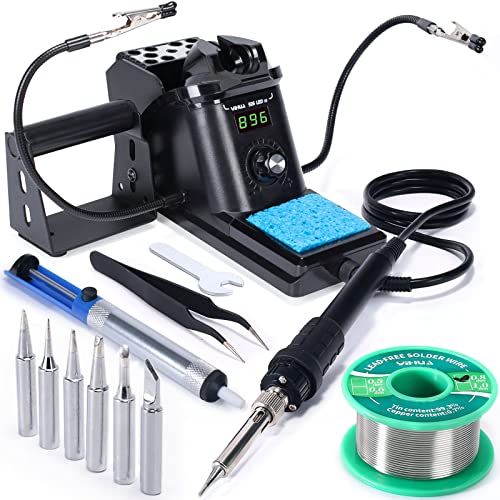
The only pick in this set with a stand-alone base unit, helping-hand clamps and a wider 194°F–896°F range.
Best for: a workbench setup with two helping hands and a proper holder Skip it if: you need something to throw in a drawer between jobs
YIHUA lists a 194°F–896°F (90°C–480°C) temperature range on the 926 III, which is the widest of the five and stretches lower than the pencil kits for delicate board work. The 12-in-1 bundle is the reason to spend up: the station itself, two helping hands, six tips from the YIHUA #1200/900M series, lead-free solder wire, a solder sucker and ESD-safe tweezers. That is a genuine home workbench in one box, not just an iron with accessories.
The base unit measures 2.8 x 7.3 x 4.5 in and weighs 1.77 lb, and the integrated iron holder saves counter space. YIHUA lists °C/°F conversion, an adjustable sleep mode at 5/10/30 minutes, and digital temperature calibration for when the readout drifts. YIHUA lists a 12-month manufacturer technical coverage window on the listing. The obvious trade-off is that this is a plug-in-and-live-there station rather than something you carry to the garage for one job. It is also the most expensive pick here, and you are paying for the base unit, the clamps, and the extra tips.
Pros:
- Widest range in this set, 194°F to 896°F
- 12-in-1 bundle with helping hands and solder sucker
- Integrated iron holder saves bench space
- Digital calibration for drift over time
- Adjustable auto-sleep at 5, 10 or 30 minutes
Cons:
- Most expensive pick in this set
- Base unit means it lives on a bench, not in a drawer
- Heat-up time not stated on the listing
4. Q-MING 80W LCD Soldering Iron Kit — Best upgrade
The digital sibling of the top pick: 80W, an LCD screen, and four extra ventilation holes on the tip for heat dissipation.

Best for: someone who liked the Q-MING pencil but wants 80W and a digital screen Skip it if: you prefer analogue controls or a lighter handpiece
This is the same brand as the top pick, in an 80W digital body. Q-MING claims a 20-second heat-up (five seconds slower than the 60W stablemate, oddly enough), the same 200°C–450°C adjustable range, and a high-definition LCD showing tip temperature. The tip design has four ventilation holes that Q-MING says provide better heat dissipation than a plain tip, which for a homeowner means the tip cools slightly faster once you set it down but reheats without a fuss when you go back to it.
The kit ships with the iron, a simple stand, a sponge, five tips, solder wire and flux paste, which is a thinner bundle than the 10-in-1 top pick. You are trading two accessories for the digital screen. That is the whole shape of this pick. If you want the reassurance of a numeric readout, and you find yourself switching between two or three temperatures on a single job, this is the version of the Q-MING to buy. Otherwise the extra spend does not buy you a faster tool.
Pros:
- LCD tip-temperature readout
- 80W ceramic core
- Ventilated tip design for heat dissipation
- Sits in the second-cheapest price position here
- Same 200°C–450°C range as the top pick
Cons:
- Slower claimed heat-up than the 60W top pick
- Fewer accessories than the 10-in-1 stablemate
- No published warranty on the listing
5. MEAKEST 60W 9-in-1 Kit — Best minimal setup
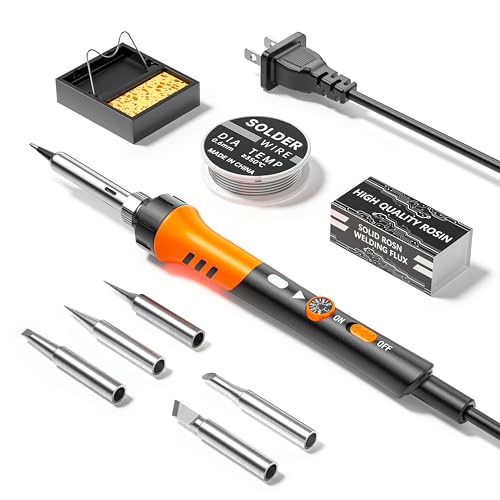
A stripped-back pencil iron for a homeowner who wants five tips, a wire and a stand, and nothing else in the box.
Best for: a homeowner who only wants five tips, a stand and a wire, nothing more Skip it if: you want a digital readout or a published warranty
MEAKEST lists a 60W iron with a 200°C–450°C adjustable range, five interchangeable tips shaped for guitars, watches, wires, computer hardware and small electronics, and an on/off switch on the handle for energy saving. The handpiece is 8.66 in long, 0.98 in wide and weighs 3.17 oz, and MEAKEST describes an ergonomic handle with a high-temperature silicone protective cover. That switch is the small differentiator: it lets you kill the tip between joints without unplugging.
This is the minimal-setup pick because the kit deliberately does not stretch into helping hands or digital screens. Nine pieces, laid out plainly. If your job is a single lamp cord and you do not expect to touch the iron again for six months, buying more capability is money on the shelf. The trade-off is that MEAKEST does not publish a heat-up time on the listing, does not include a digital readout, and does not list a warranty, so this is the pick with the fewest published specifications of the five.
Pros:
- On/off switch on the handpiece
- Five shaped tips for varied jobs
- Silicone-covered ergonomic grip
- 200°C to 450°C adjustable range
- Lightweight 3.17 oz body
Cons:
- No published heat-up time
- No digital temperature readout
- No stated warranty on the listing
- Fewer published specifications than the other four picks
Pencil iron or full station: which suits a homeowner?
The five picks split cleanly. Four are pencil-type irons: a handpiece with a cord and an inline control. One is a bench station: a base unit with a dial or screen, and a lighter handpiece on a tether.
A pencil iron plugs straight into the wall. You store it in a drawer, you pull it out for a lamp cord, and you put it back. The Q-MING top pick, both Liouhoum and Q-MING digital models, and the MEAKEST all fit that shape. For most house jobs, this is the right form factor. The reason is not the tool, it is the frequency. If you solder twice a year, a station on your counter is a station in your way.
A bench station, meaning the YIHUA here, earns its space if you have a workbench and you actually solder often enough that helping-hand clamps save you time. The wider 194°F–896°F range and the six-tip assortment matter more when you are switching between electronics and heavier work in the same session. If you do not have a dedicated bench, buy a pencil.
What a homeowner actually solders
The homeowner brief covers a specific and predictable set of jobs, and the picks above are chosen against that list rather than against a pro electronics workflow.
- Lamp and appliance cord repairs, where the joint is a stripped copper lead and a lug or a splice.
- Doorbell wiring, low-voltage transformers, and thermostat lead re-terminations.
- Speaker wire and headphone jack repairs, where you need a finer tip and a lower temperature.
- Model railway, RC car and hobby electronics, where a five-tip set stops being a nicety.
- Occasional through-hole board repairs on a game console, a remote or a smoke alarm.
Notice what is not on that list: SMD rework, lead-free production soldering, and continuous-duty bench work. If your project list runs into those, none of these picks is the right buy and you want a temperature-controlled station in a higher price tier than any of these.
- Lamp cord: chisel tip, 340°C to 380°C.
- Speaker wire: conical tip, 300°C to 340°C.
- Through-hole board: fine chisel, 320°C to 360°C.
What the listings do not tell you
Product listings answer the questions manufacturers want to answer. Three things they rarely tell a homeowner up front are worth knowing before you pick.
First, tip life. Every tip on every one of these irons wears out. Copper tips plated with iron survive longer than plain copper, but nothing survives a dry sponge and a full-heat idle. Wipe the tip between joints, and drop the temperature when the iron is sitting.
Second, cord length and cord type. None of the five listings publishes a cord length figure, which is odd, and cord flex matters more than wattage when you are working over a workbench with the outlet across the room. Expect to plug into a nearby socket, not a distant one.
Third, replacement tip availability. The YIHUA station names a specific tip series (#1200/900M), so replacements are easy to source. The pencil kits list their tip counts but not the fitment standard. If long-term tip supply matters to you, that is the difference between a five-year iron and a two-year iron.
The verdict
If you are buying one soldering iron for the house and you want to stop reading, the Q-MING 60W Soldering Iron Kit is the answer. The 15-second claimed heat-up from a ceramic core, the five interchangeable tips, and the 10-in-1 bundle with wire and flux mean you open one box and repair the thing that broke. It is also the fastest seller of the five in this category, which is a soft signal but not nothing.
Two conditions flip the recommendation. If you have a workbench and you solder often enough to want helping-hand clamps and a solder sucker within reach, the YIHUA 926 III station is the better spend, with a wider 194°F–896°F range and a 12-month coverage window. If you want a digital readout and the lowest price position of the five, the Liouhoum 80W kit takes that combination and adds a 24-month replacement warranty that no other pick here matches. The cutoff between the top pick and the Liouhoum is simple: if you want to see the number, buy the Liouhoum; if you want the fastest heat-up on a lighter handpiece with more accessories, buy the Q-MING.
FAQ
Is a soldering iron worth it for a homeowner?
A soldering iron is worth it for a homeowner if you own three or more items with wires you would otherwise pay someone to repair or replace: a lamp, a speaker system, a doorbell, a strand of holiday lights. Any one of the five picks pays for itself against the cost of a single trip to a repair shop, and every pick includes the wire and flux to make the first repair.
What wattage soldering iron do I need for home use?
The wattage soldering iron you need for home use sits between 60W and 80W, which is where every pick in this roundup lands. Below 60W struggles on thicker copper leads like a lamp cord. Above 80W is aimed at continuous-duty work most homeowners never do. Prioritise a ceramic core and an adjustable temperature dial over the wattage number itself.
Q-MING 60W or Liouhoum 80W: which should a homeowner buy?
Choose the Q-MING 60W if you want the faster claimed heat-up at 15 seconds, five tips and the more complete 10-in-1 bundle. Choose the Liouhoum 80W if you want the digital LCD readout, the 24-month replacement warranty, and the cheapest price position in the set. Both use ceramic heating cores. The Q-MING is easier to grab and go; the Liouhoum shows you the exact temperature.
Can these soldering irons handle car electrical repairs?
These soldering irons can handle car electrical repairs on the low-current side: door speakers, dash wiring, aftermarket lighting looms, trailer light plugs. Set the tip to 380°C for automotive-gauge copper and use rosin-core solder. What none of the five picks is built for is battery cable or starter lead work, where the copper is thick enough to sink heat faster than an 80W iron can deliver it.
What is the biggest mistake first-time solderers make?
The biggest mistake first-time solderers make is heating the solder instead of the joint. You touch the tip to the wire and the lug, wait for the metal to come up to temperature, and then feed the solder into the joint itself. It should flow like water, not sit like glue. Every pick here gets hot enough; the technique is what gives you a bright, shiny joint instead of a grey, cold-looking blob.
A soldering iron for a homeowner is not a purchase you research for a week. Pick the shape that matches your storage: pencil in a drawer, station on a bench. Then buy the kit with the tips and the wire already in the box, so the first repair is not a second shopping trip. The Q-MING 60W does that better than the others here, with a genuinely useful five-tip set, a fast ceramic core, and enough consumables to finish two or three jobs before you need to top up. Keep the tip clean, drop the temperature between joints, and one iron will outlast several rounds of household wear.